Vision Board Creation: Digital vs Physical
Discover the power of vision boards for manifestation. Compare digital vs physical boards, learn creation techniques, and find the best approach for your goals.
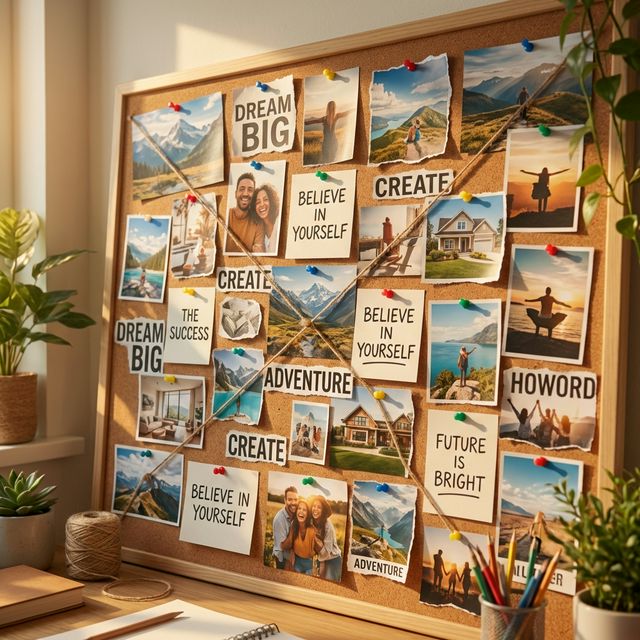
Vision boards are powerful manifestation tools that help you visualize your goals and align your energy with your desires. Whether you choose digital or physical boards, the key is creating something that resonates with you and keeps you connected to your dreams.
Making one for the new year? Our 2027 vision board guide has ideas for every life area, a free printable template and three phone wallpapers.
What is a Vision Board?
The Science Behind Vision Boards
- Attention: Seeing your goals daily keeps them in mind and makes related opportunities easier to notice
- Emotional Connection: Images you chose yourself carry feeling
- Daily Reminder: Keeps your goals visible and top-of-mind
How Vision Boards Work for Manifestation
- Subconscious Programming: Influences your beliefs and expectations
- Energy Alignment: Raises your vibration to match your desires
- Law of Attraction: Aligns you with the energy needed to manifest
- Action Inspiration: Motivates you to take inspired action
Digital vs Physical Vision Boards
Digital Vision Boards
Advantages
- Easy to Update: Change images and goals quickly
- Portable: Access from any device, anywhere
- Shareable: Easy to share with others for accountability
- Space Efficient: No physical storage needed
- Interactive: Can include videos, audio, and animations
- Backup Safe: Never lose your board to damage or loss
Disadvantages
- Less Tangible: May feel less "real" than physical boards
- Screen Time: Adds to digital device usage
- Less Personal: May feel less connected to the process
- Technical Issues: Requires devices and internet access
Best For
- Tech-savvy individuals
- People who travel frequently
- Those who want to update goals regularly
- Minimalist lifestyles
- Social sharing and accountability
Physical Vision Boards
Advantages
- Tangible Connection: Physical presence creates stronger emotional bond
- No Tech Required: Works without devices or internet
- Personal Touch: Hand-crafted feel adds personal meaning
- Tactile Experience: Cutting, pasting, and arranging is therapeutic
- Visual Impact: Large size creates powerful visual presence
- Ritual Creation: The process itself is manifestation practice
Disadvantages
- Space Requirements: Needs wall or board space
- Less Flexible: Harder to update or change
- Not Portable: Can't take with you easily
- Potential Damage: Can be damaged or lost
- Messy Process: Requires supplies and cleanup
Best For
- Kinesthetic learners
- People who enjoy crafting
- Those with dedicated space
- Individuals who prefer tangible items
- Traditional manifestation practitioners
How to Create a Digital Vision Board
Step 1: Choose Your Platform
- Canva: User-friendly with templates
- Pinterest: Easy image collection and organization
- Adobe Express: Professional design tools
- Figma: Advanced design capabilities
- Manifestive App: Built-in vision board feature
Step 2: Collect Your Images
- Stock Photos: High-quality professional images
- Personal Photos: Your own images and memories
- Screenshots: Save images from websites
- AI Generated: Create custom images with AI tools
- Inspirational Quotes: Add motivational text
Step 3: Design Your Board
- Layout: Choose a grid, collage, or free-form layout
- Colors: Use colors that resonate with your goals
- Text: Add affirmations and goal statements
- Categories: Organize by life areas (career, love, health, etc.)
- Size: Make it large enough to see details clearly
Step 4: Add Interactive Elements
- Videos: Include motivational or instructional videos
- Audio: Add affirmations or guided meditations
- Links: Connect to resources and tools
- Animations: Use subtle animations for engagement
- Updates: Set reminders to review and update
Step 5: Make It Accessible
- Set as Wallpaper: Use as phone or computer background
- Save to Cloud: Access from any device
- Share with Others: Get accountability and support
- Print Copies: Create physical versions for key locations
- Set Reminders: Schedule regular review sessions
How to Create a Physical Vision Board
Step 1: Gather Your Supplies
- Base: Poster board, cork board, or canvas
- Images: Magazines, photos, printed images
- Tools: Scissors, glue, markers, stickers
- Decorations: Ribbons, glitter, washi tape
- Frame: Optional frame for protection
Step 2: Set Your Intention
- Meditate: Spend time connecting with your goals
- Journal: Write about what you want to manifest
- Choose Theme: Focus on one area or create comprehensive board
- Set Timeline: Decide when you want to achieve your goals
- Feel Emotions: Connect with the feelings of success
Step 3: Collect Your Materials
- Magazines: Cut out images that resonate
- Personal Photos: Include photos of yourself and loved ones
- Print Images: Find and print specific images online
- Words and Phrases: Cut out inspiring text
- Colors: Choose colors that represent your goals
Step 4: Create Your Board
- Arrange Images: Place images in a way that feels right
- Add Text: Include affirmations and goal statements
- Use Colors: Apply color psychology to your design
- Add Personal Touches: Include your own artwork or writing
- Create Flow: Arrange elements to create visual flow
Step 5: Display and Use
- Choose Location: Place where you'll see it daily
- Good Lighting: Ensure it's well-lit and visible
- Regular Review: Look at it daily and feel the emotions
- Update Regularly: Add new goals and remove achieved ones
- Share with Others: Show it to supportive friends and family
Advanced Vision Board Techniques
The Layered Approach
- Background Layer: Base colors and textures
- Image Layer: Photos and illustrations
- Text Layer: Affirmations and goal statements
- Emotional Layer: Elements that trigger positive emotions
- Action Layer: Steps and actions toward goals
The Category Method
- Career: Professional goals and aspirations
- Relationships: Love, family, and social connections
- Health: Physical and mental well-being
- Finance: Money, abundance, and prosperity
- Personal: Growth, learning, and self-improvement
The Timeline Approach
- Short-term: Goals for the next 3-6 months
- Medium-term: Goals for the next 1-2 years
- Long-term: Goals for the next 5-10 years
- Lifetime: Ultimate dreams and aspirations
Using the Manifestive App for Vision Boards
- Write your goal as a manifest and read it each day
- Affirmations, including ones you record in your own voice
- A journal for notes, gratitude and progress
- Vision boards built from your own photos (Premium)
- Daily Sign check-ins and a streak
- An AI coach for finding wording and next steps
Vision Board Best Practices
Do's
- Be Specific: Include specific goals and outcomes
- Use Emotions: Choose images that make you feel good
- Include Yourself: Add photos of yourself in the images
- Regular Review: Look at your board daily
- Feel the Emotions: Connect with the feelings of success
- Take Action: Use your board to inspire action
- Update Regularly: Remove achieved goals and add new ones
Don'ts
- Don't Focus on Lack: Avoid images of what you don't want
- Don't Be Vague: Avoid generic or unclear images
- Don't Ignore It: Don't create a board and forget about it
- Don't Doubt: Avoid images that don't feel believable
- Don't Rush: Take time to create something meaningful
- Don't Compare: Focus on your own goals, not others'
Troubleshooting Common Issues
"I Can't Find the Right Images"
- Use specific search terms
- Look for high-quality, professional images
- Consider commissioning custom artwork
- Use AI tools to generate specific images
- Take your own photos
"My Board Feels Cluttered"
- Focus on fewer, more important goals
- Use white space effectively
- Group related images together
- Choose a consistent color scheme
- Remove images that don't resonate
"I Don't Feel Connected to My Board"
- Include more personal elements
- Add photos of yourself
- Use images that trigger strong emotions
- Review your board daily
- Update images that don't resonate
"Nothing Is Happening"
- Check if you're taking inspired action
- Ensure you're feeling the emotions
- Look for small signs and synchronicities
- Be patient - results can take 21-90 days
- Review and update your board regularly
Conclusion
Whether you choose digital or physical vision boards, the key is creating something that resonates with you and keeps you connected to your goals. The most important thing is to review your board regularly, feel the emotions of your desires, and take inspired action toward your goals.
Remember: Your vision board is a tool to help you align with your desires, not a magic solution. The real power comes from the emotional connection you create and the inspired action you take.
Ready to create your vision board? Download the Manifestive app and start building your digital vision board today. Manifestive is free to start.
Start creating your vision board today and watch your life transform.
Practice this daily with Manifestive
Free to start on iOS and Android


Scan with your phone to get the app